The recorder
Sidecar (Pi)
Section titled “Sidecar (Pi)”hardware: a 5-minute take of 13 sources with no dropped audio.
The Pi records the Rytm’s Overbridge channels, its own voices and the send effect returns to its SD card, one WAV file per source, all sample-aligned.
| Sources | |
|---|---|
00_MASTER |
the Rytm’s main mix, stereo |
01_MAIN_L, 02_MAIN_R |
the same as two mono files |
03_BD .. 10_CY-CB |
the Rytm’s 8 voice outputs |
11_IN_L, 12_IN_R |
the Rytm’s audio inputs, or 11_FX_L, 12_FX_R while the IN L/R source is the Rytm’s FX return (below) |
13_VOICE1 .. 20_VOICE8 |
the Sidecar’s voices as rendered |
21_FX1, 22_FX2 |
each send effect’s own return, stereo |
How to record: open sidecar.local, tab Record.
- Tick the sources (groups, Select all / None).
- Choose manual or armed. Armed starts a take when the Rytm’s sequencer starts (MIDI PLAY) and stops on STOP, then arms again. The Rytm must send its transport over USB (MIDI CONFIG, TRANSPORT SEND).
- Press Record (or Arm). The page shows the elapsed time, a peak meter per source, free space and the time left, the card’s speed and a red warning if blocks were dropped.
- Stop. The takes are listed below, each file downloadable.
The display shows a red REC h:mm:ss while recording.
- Files:
/Recordings/<name>_<NNN>/<NN>_<SOURCE>.wav, 48 kHz, 24-bit (or 16-bit), mono or stereo. Every file of a take starts on the same frame and has the same length. - Power loss: one file is synced every 2 seconds, in turn (so each file every 2 s times the number of files). After a power cut the next boot repairs the headers, and the take opens up to its last sync.
- Limits: a take stops before any file reaches 4 GB (FAT32): about 4 hours for a stereo 24-bit file. A full card stops the take and closes the files.
- Card speed: all 23 sources at 24-bit need about 3.6 MB/s. Use a fast card; the page shows whether it keeps up.
- Latency: the round trip to the Rytm (about 6 ms) is not compensated between the Rytm’s channels and the Sidecar’s voices.
The REC page on the Rytm
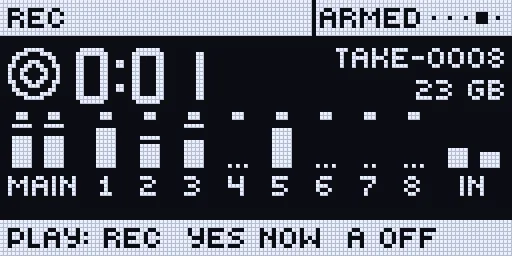
Section titled “The REC page on the Rytm”hardware (Pi and Sidecar Mini). Open the remote pages (TRK + YES) and press LEFT twice from SIDECAR (SCOPE, then REC). YES records and stops; encoder A arms (right) or disarms (left). The page shows the take’s time in large digits, its name, the card’s free space and the hours left, and the meters with the recorded channels marked.
Playback
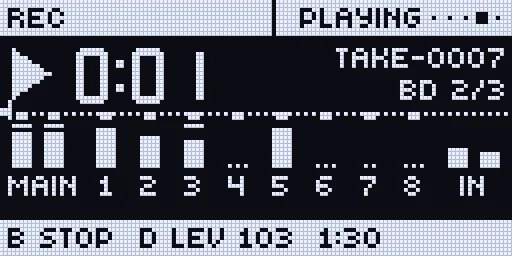
Section titled “Playback”hardware (Pi). One channel of one take plays into the Rytm’s MAIN, on top of everything else. On the REC page: B turned picks the channel, B pushed plays and stops, C picks the take, D sets the level. On sidecar.local, the Record tab has a play button per channel of each take, and Stop. A take that starts recording stops playback; playback never runs while a take records.
Known: picking another take with C while one plays can glitch once; a fix is on the way.
The FX return on IN L/R
Section titled “The FX return on IN L/R”hardware (2026-10-18: echoes seen on SCOPE’s FX source, on the Sidecar Mini). The Rytm can put its own delay + reverb return on the Overbridge IN L/R instead of its audio inputs: Sound tab, IN L/R source: FX return. The recorder then names those files 11_FX_L / 12_FX_R, and the SCOPE page calls the source FX. Never send these two channels back into the Rytm through the computer’s audio (a loop on your mixer): the effect would feed itself. The page warns while the switch is on.
Sidecar Mini (Teensy)
Section titled “Sidecar Mini (Teensy)”hardware (stereo, with a fast card).
The Mini records the Rytm’s Overbridge IN stream to the Teensy’s SD card, in the same folders and format as the Sidecar on the Pi, so the takes line up in a DAW the same way.
| Mode | Files | Needs |
|---|---|---|
| Stereo | 00_MASTER.wav (MAIN L/R) |
a stock Teensy 4.1 and a fast SD card (A1/A2, U3/V30) |
| Stems | 01_MAIN_L .. 12_IN_R, mono |
PSRAM in testing |
- Measured on hardware with a fast card: 24-bit stereo for 70.8 s and 16-bit for 62.4 s, 0 dropped blocks, worst card write 10 ms and 3.1 ms.
- Without PSRAM the recorder’s buffer is 32 KB, shared with USB audio: about 114 ms of 24-bit stereo, 170 ms at 16-bit (USB audio pauses while the recorder is armed or records). A slow card falls behind; the dropped blocks are written as silence, so the files keep time, and the console says “the card fell behind”. Record 16-bit, or use a faster card. PSRAM (a 768 KB buffer) removes the need.
- Record from the REC page or the console’s Record tab: manual or armed (PLAY starts, STOP ends), stereo or stems, 16 or 24 bit. The takes are in
/Recordings(Files tab). - The Mini has the REC page on the Rytm too: YES records and stops, encoder A arms; stereo MASTER without PSRAM, stems with PSRAM;
USB OFFshows while USB audio is paused for the recorder. The SYSTEM page shows the recorder row (IDLE, ARM, REC m:ss). Playback and channel picking on the trig keys are the Pi’s (the Mini’s channel picking follows once stems work with PSRAM). - A power cut: the next boot gives the take being written its true length.