The Rytm side
Everything Sidecar does is played from the Rytm. The mods add machines, pages and menu items; everything else on the Rytm works as stock.
EXT machines
Section titled “EXT machines”Each Sidecar machine appears in the Rytm’s machine list on every track, next to the analog machines. Open the track’s SRC page, press SRC again for the machine list, pick the machine and press YES.
A Sidecar voice keeps the silent “disabled” analog source and plays the Sidecar’s audio in its place, through the track’s own analog filter, overdrive and amp. So the track’s FILTER and AMP pages, its envelopes and its outputs all work on it.
The SRC page shows the machine’s eight knobs. They behave like any Rytm knob: turn, p-lock, slide, modulate with the LFO. The values reach the Sidecar with every trig, so a p-lock lands on its step. Page 2 (the SMPL key) is either the stock sample layer or eight more Sidecar knobs, depending on the machine.
| Machine | SRC knobs (A..H) | Page 2 |
|---|---|---|
| PLAITS | ENG HRM TIM MOR DEC LPG TUN LEV | TMD MMD FM AUX / FIN VEL GLD VOL |
| DAISYSP | ENG STR BRI DMP INP EXC TUN LEV | EXCITER: OUT FB XLV XTN / XDC XP4 XP5 WID |
| DSP SAMPLE | ENG STR BRI DMP MIX FB TUN LEV | SD SAMPLE: TUN FIN SMP MOD STA END LOP LEV |
| DIGIDRUM | ENG and the engine’s seven controls (named per engine) | the stock sample layer |
| JUNO | PAT CUT RES ENV ATK DEC REL LEN | the stock page, muted |
| 6-OP FM | PAT TIM MOR DEC LPG TUN LEV LEN | the stock page, muted |
| U1..U5 | the user machine’s own knobs and names | sample layer or eight more knobs |
What each knob does is on Voices and machines.
Names from the Sidecar’s card show on the Rytm: DSP SAMPLE’s SMP shows the pool sample’s name, JUNO’s and 6-OP FM’s PAT show the patch name.
The SIDECAR folder
Section titled “The SIDECAR folder”The Rytm’s sample browser (GLOBAL > SAMPLES, or FUNC + SMPL, DOWN, FUNC + YES) shows a folder SIDECAR at the +Drive root (called TEENSY before the 1021 builds). Inside it is the Sidecar’s card, on the Pi as well as the Teensy: folders and WAV files with their sizes, and the JUNO and DX7 banks.
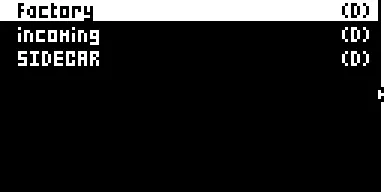
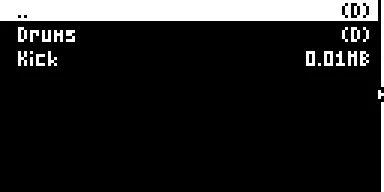
Screenshots: sfx1021 in the emulator, with a stand-in Sidecar listing two entries. in testing (the TEENSY name was checked on hardware; SIDECAR is new in 1021)
- LOAD TO PROJ on a Sidecar file adds it to the project’s Sidecar pool (stored on the Sidecar, one pool per project). Nothing is copied into the Rytm.
- DSP SAMPLE’s SMP knob then picks from that pool: 0 is OFF, N is pool slot N.
- LOAD TO PROJ on a JUNO patch or a DX7 voice adds it to the project’s JUNO or FM list, which the PAT knob then steps through.
User slots U1..U5
Section titled “User slots U1..U5”Five machine slots, U1..U5, play user machines: loadable machine plugins on the Sidecar’s card. Pick them from the machine list like any machine. See User machines for installing them.
To choose which machine a slot plays from the Rytm:
- Open the track menu: FUNC + CHRO. Five items
U1 <name>..U5 <name>follow SAVE TRACK. - Move to a slot and press YES. Each YES steps that slot to the next installed machine; after the last it clears the slot.
- A popup shows the answer: READY, LOADING, NOT INSTALLED, NO ROOM, STOP TO INSTALL, NOT ON CARD, BAD, or NO SIDECAR (no Sidecar answered, after about 2 seconds; NO TEENSY before 1021).
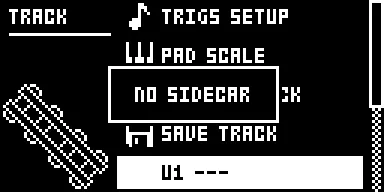
Screenshot: sfx1021 in the emulator, no Sidecar attached. in testing
The slot menu can hold the screen for up to 2 seconds while it waits for the Sidecar.
What the machine list shows per slot:
| Sidecar says | Machine list |
|---|---|
| nothing yet (no Sidecar) | USER n |
| empty | USER n --- |
| ready | the machine’s name |
| missing, bad, no room, crashed, timed out | ! + the reason + the name: !MISS, !BAD, !ROOM, !CRSH, !TIME (see !NAME on the Rytm) |
| loading | the name + ... |
| ready, but this sound was made for another machine | ! + the name, and the track stays silent |
Sounds remember which machine they were made for (a fingerprint). A sound saved with machine A stays silent if its slot now holds machine B, rather than playing B with A’s settings.
The SEND FX pages
Section titled “The SEND FX pages”The Sidecar runs two send effects, SEND FX 1 and SEND FX 2. Every track has a send to each, and the FX track has a page per effect.
Sends, on every track: press AMP twice for AMPLITUDE 2.
| Knob | |
|---|---|
| A SFX1 | the track’s send to SEND FX 1 |
| B SFX2 | the track’s send to SEND FX 2 |
Effects, on the FX track: press SRC (DELAY) again for SEND FX 1, and SMPL (REVERB) again for SEND FX 2. A further press goes back to the stock page.
| Knob | |
|---|---|
| A TYPE | the effect: OFF, CHORUS, COMB, CRUSH, RINGMOD, HALO, and on the Pi RINGS, CLOUDSEED, STUTTER |
| B P1 ROUTE | PRE: the return enters before the Rytm’s analog distortion and compressor (the default). POST: it is added after them, clean |
| C..F P2..P5 | the effect’s own knobs, with its own labels (RATE, DCY, MODL…) |
- The TYPE list comes from the Sidecar, so it shows the effects your Sidecar plays. An effect it cannot play shows as
!NAMEand stays silent. - TYPE and ROUTE are stored in the kit and cannot be p-locked. P2..P5 can be p-locked on the FX track.
- A TYPE change never clicks: the old effect fades out in 10 ms and the new one fades in from a clean state.
- Some knobs show a zone name and a number, for example RINGS P3
MODAL 12. - With a Sidecar older than the mods, P2..P5 show numbers instead of names. Update the Sidecar.
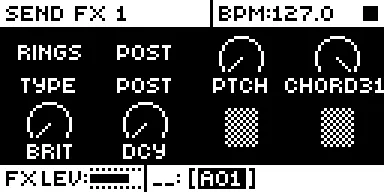
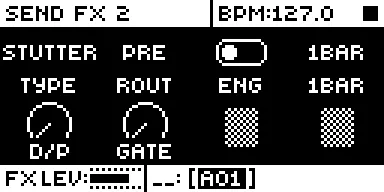
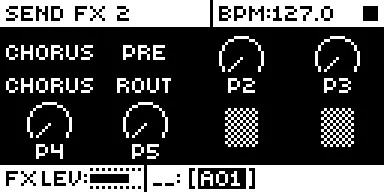
Screenshots: sfx1021 in the emulator, with the Sidecar’s labels sent by a stand-in host. The SEND FX pages and labels are hardware (with the Pi); the stepped TYPE, ROUTE and STUTTER knobs are in testing.
Each effect’s knobs are on Send effects.
Stepped knobs
Section titled “Stepped knobs”in testing (in sfx1021)
Knobs that pick from a list step one item per detent, like the Rytm’s own FILTER TYPE knob, and show the item’s name where the dial was:
- the ENG knobs of PLAITS, DIGIDRUM, DAISYSP and DSP SAMPLE, DAISYSP’s INP and OUT, DSP SAMPLE’s MOD, the PAT knobs of JUNO and 6-OP FM, and a user machine’s list, preset and pool knobs;
- the SEND FX pages’ TYPE (over the Sidecar’s list), ROUTE (PRE or POST), and effect knobs that are pure selectors, such as STUTTER’s ENG and LEN.
Knobs with a number inside a zone (RINGS’ model with its structure, say) stay continuous.
The double stop
Section titled “The double stop”Press STOP twice and the Rytm cuts its delay and reverb tails. With the mods it also tells the Sidecar (an “all sound off”): both send effects fade out in about 5 ms and clear, and STUTTER drops back to the dry mix.
The remote UI
Section titled “The remote UI”hardware (on Sidecar Mini and Sidecar; this release needs the rui1027d Rytm build)
The remote UI lets the Sidecar draw its own pages on the Rytm’s screen. The Rytm side only shows what it is sent and passes the keys and knobs on.
- TRK + YES (hold TRK, press YES) opens it: the status pages SIDECAR and SYSTEM, and the live pages LFO, REC and SCOPE (LEFT from SIDECAR goes to SCOPE, REC, LFO). With
rui1027dthe machine pages are not in this list: they show on the Rytm’s own SRC page (the SRC view). An older Rytm build shows them here, after SYSTEM, one per track that plays PLAITS, JUNO, 6-OP FM or DSP SAMPLE (GRAIN). - LEFT / UP: the previous page. RIGHT / DOWN / PAGE: the next. NO: back to SIDECAR; NO on SIDECAR leaves the remote pages (in testing).
- TRK + LFO opens the remote pages straight on the LFO page (in testing).
- A page catches only the keys and knobs it uses. PLAY, STOP and RECORD always reach the Rytm (FUNC + PLAY / STOP too); the pads, MUTE / CHRO / SCNE / PERF, FILL, the trig keys, BANK and tap tempo work as on the stock screen. Keys that open stock screens (TRIG, SRC, SMPL, FLTR, AMP, LFO, FX, GLOBAL, YES, TRK and so on) stay with the Sidecar.
- The SIDECAR and SYSTEM pages catch every knob, so nothing changes underneath while you look at them. SCOPE and REC use their own encoders.
- With a Sidecar firmware older than the key masks, the page catches every key and knob except PLAY, STOP and RECORD.
- The encoders A..H change the shown voice’s parameters. Such an edit holds until the Rytm’s own value moves (its knob, a p-lock, another sound). It is not saved in the kit.
- The pads keep playing.
- On the Rytm’s own SRC page and SMPL page 2, user-machine knobs the machine does not use show as hatched boxes, like the Rytm’s own unused knobs (in testing).
- JUNO’s and 6-OP FM’s preset names appear at once when a track switches to that machine, and the voice pages follow a machine change on the Rytm at once (in testing).
- Leave with TRK + YES again. The page also closes by itself 1 second after the Sidecar stops answering.
Since 1021 every letter on these pages is drawn by the Rytm itself, in its own font, at the stock screens’ sizes and places: the title bar, the labels and the bottom bar look like the Rytm’s own pages. The Sidecar sends the graphics and the text items; no font data of the Rytm is in Sidecar. A turn shows at once: the Rytm echoes the new value in the bottom bar itself, and the Sidecar’s redrawn frame follows about 25 ms later (it was 75 ms).
The status pages. SIDECAR shows the eight Sidecar voices with their machines (numbered by voice: 1 BD, 2 BT, 3 SD, 4 LT, 5 CH/OH, 6 MT/HT, 7 CY/CB, 8 RS/CP), and FX1 and FX2 with their TYPE and PRE / POST. SYSTEM shows the user slots U1..U5 (--- empty), the recorder (REC IDLE or the take’s time), the Rytm’s audio stream (OB OK / STOP, UND = underruns), the load of the render cores, and in the bottom bar the network (ETH UP or WIFI UP with the address; never a network name or key). The Sidecar Mini has no network, so its SYSTEM page has no network line; its recorder row shows IDLE, ARM or REC m:ss.
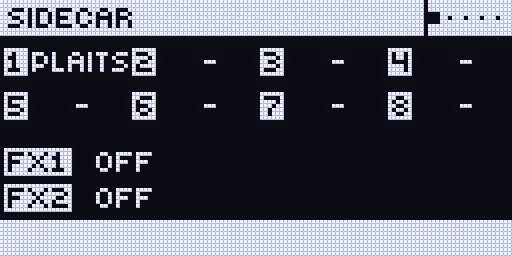
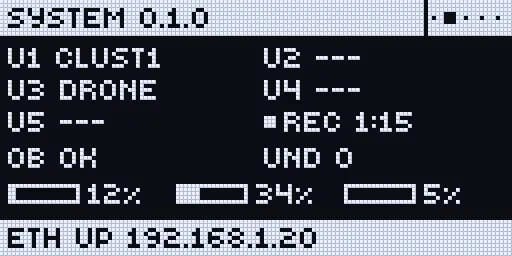
A machine page belongs to a track and carries its name (BD, SD, …; a shared pair such as RS/CP has one page); PLAITS, JUNO, 6-OP FM and DSP SAMPLE (GRAIN) have one, DAISYSP, DIGIDRUM and user machines do not. With rui1027d it shows in the SRC view, below. It is laid out like a stock knob page: the dials in the same places, the labels on the same rows. ENG shows the model’s name where the dial would be.
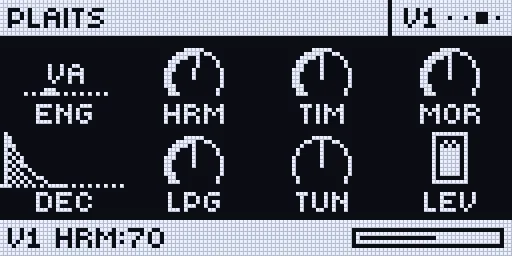
Screenshots: rui1027d in the emulator with the test line’s host code (mock values); on a real Rytm the text is the Rytm’s own and it responds at once.
- It needs the test line’s Sidecar firmware (Pi kernel or Mini firmware). An older Pi kernel opens the pages without text.
Tracks and voices
Section titled “Tracks and voices”Twelve tracks can choose a Sidecar machine; eight Sidecar voices sound at once. Like the Rytm’s own paired tracks, RS/CP, MT/HT, CH/OH and CY/CB share one voice each, so a pair plays one at a time. The meters on SCOPE and REC, and SCOPE’s sources, follow the Rytm’s track order. hardware (Pi: meters by track)
The SRC view
Section titled “The SRC view”hardware (the rui1027d Rytm build, 2026-10-19, also after a USB replug)
On a track that plays a Sidecar machine with a page (JUNO, 6-OP FM, PLAITS, DSP SAMPLE and its GRAIN view), the Rytm’s own SRC page shows the Sidecar’s machine page with its graphics: JUNO’s envelope and filter, the FM algorithm, DSP SAMPLE’s waveform, GRAIN’s cloud. It is drawn from the Rytm’s own values, so every key and knob stays the Rytm’s: edits, p-locks, kits and saving work as on a stock SRC page. The bottom bar names the last knob you turned (for example BD CUT:73).
- Other machines, and analog tracks, show the stock SRC page.
- The stock machine list, popups, PERF and holding TRK or BANK show the stock screen while they are up.
- Leaving SRC shows the stock page again; TRK + YES opens the remote pages as usual and takes precedence.
- When the Sidecar goes away, the stock SRC page is back within about a second.
- Known limits of the SRC view: a turn shows on the view after about 50-100 ms; edits made while holding a trig (p-locks) are not shown on the view, which shows the sound’s own value.
More pages
Section titled “More pages”Most of these are tested on hardware and part of this release; each says which.
All of these are drawn by the Sidecar. The Rytm only shows what it is sent, so new pages, layouts and graphics come with a Sidecar update (the Pi’s SD card or a Teensy upload) and do not need a new Rytm flash. Only a new kind of building block on the Rytm side, like the connect screen below, needs one.
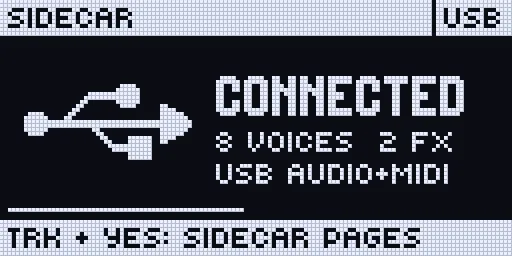
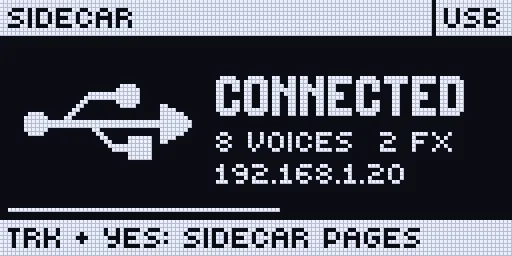
Connect screen hardware (the rui1027d Rytm build). When the Sidecar connects to a Rytm that is already on, or the cable is plugged back in, a USB screen shows for 3 seconds: the Sidecar’s name, CONNECTED, the voices and effects, and the Pi’s address (or USB AUDIO+MIDI). PLAY, STOP, RECORD and the pads keep working under it; an arrow, YES or NO only closes it, any other key or knob closes it and does its normal job.
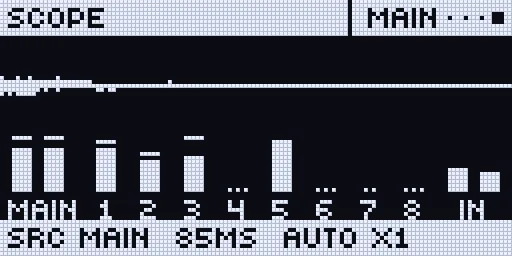
SCOPE and meters hardware. The Rytm’s output, a track or the inputs (sources in track order: MAIN, BD, SD, RS/CP, BT, LT, MT/HT, CH/OH, CY/CB, IN L, IN R) as a scope, with a level meter per track and a 1-second peak hold. Knob A: the source, B: the timebase (21 ms to 1.4 s), C: the gain.
Sample waveform in testing on the DSP SAMPLE and GRAIN pages: the sample with its start and end, loop brackets, reverse and slice lines, following the knobs as you turn them. On GRAIN: the grain window and its spread.
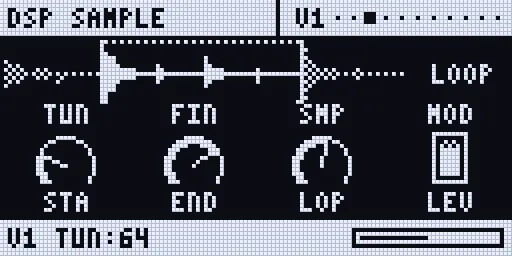
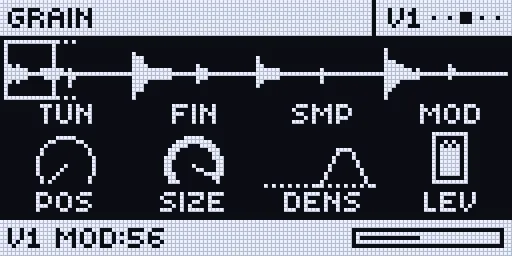
Recorder and playback hardware (recording on the Pi and the Mini, playback on the Pi): YES records and stops, knob A arms; B picks a channel and plays it into the MAIN, C the take, D the level. See The recorder.
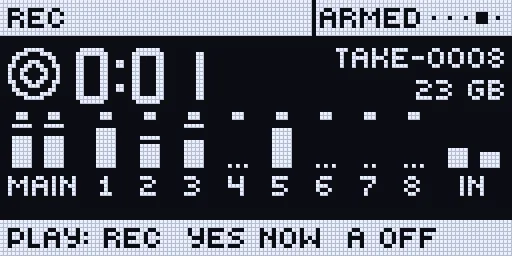
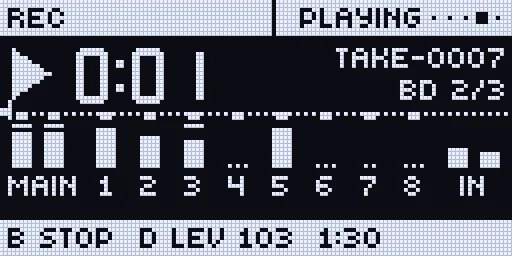
Channel picking (in testing, Pi; on the Mini once stems work with PSRAM): on the REC page the trig keys choose what the next take records: T1..T8 the tracks, T9 MAIN, T10 / T11 the inputs (or FX L / R with the FX return). Their lights show it: blue recorded, orange not. Not while a take records.
Machine graphics in testing. 6-OP FM shows the algorithm of the patch PAT picks (operators, carriers on the output line, feedback); JUNO shows its envelope and filter curve.
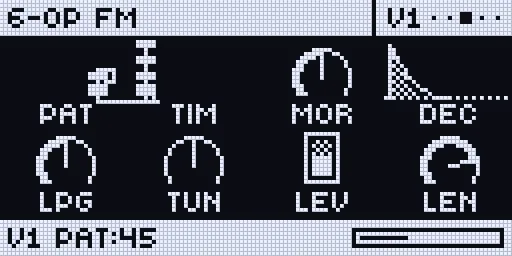
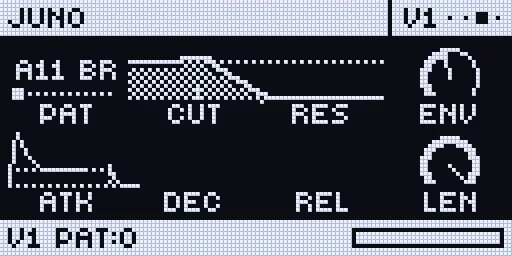
Screenshots: the emulator with the Sidecar’s host code (mock values); the text is drawn by the emulated Rytm in its own font.