CHOP (slicing a sample)
in testing (Mac and emulator)
CHOP is a Sidecar machine that cuts one sample into up to 64 slices and plays them from the Rytm’s trigs, its pads in CHRO mode and the Sidecar sequencer. Every slice has its own settings (pitch, gain, reverse, envelope, loop, choke group and more). The settings never change the sample itself.
Getting started
Section titled “Getting started”- On a track’s SRC page, pick CHOP in the Rytm’s machine list (after LIVE IN). Any track can play it.
- Get a sample in: turn SRC (knob A) to open the SAMPLES bank list. Pick a row, or press FUNC + YES on a row to load a WAV or AIFF from the card. A take from the sampler lands in the same SAMPLES list.
- The sample is cut into 16 equal slices to start with. Play a trig: it plays slice SLC (knob B).
- To chop it your way, open the slice editor: push encoder B..H on the SRC page (below).
A sample is held whole in memory, up to 87 seconds (a longer one: its first 87 s).
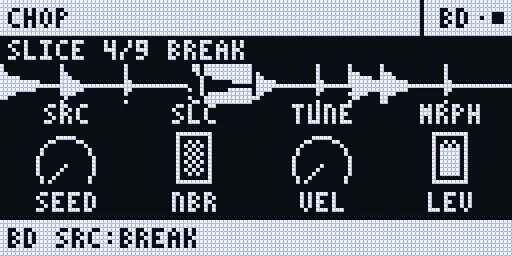
Which slice plays
Section titled “Which slice plays”- A Rytm trig plays slice SLC. P-lock SLC for a different slice on each step. A trig with a NOTE lock plays that many slices up or down from SLC.
- The CHRO pads play 12 slices from SLC: the first pad plays SLC, the next pad SLC + 1, and so on. The Rytm’s octave keys (UP / DOWN in CHRO) move the window.
- A poly track (Poly mode): the step’s note is the slice (the lowest note is slice 1), so the piano roll becomes a slice lane. Up to 8 slices sound at once.
- Past the last slice, the count starts again at slice 1.
- A slice plays to its end; a looped slice loops while it is held.
The knobs
Section titled “The knobs”| Knob | ||
|---|---|---|
| A SRC | the sample | a row of the SAMPLES pool |
| B SLC | the slice the trigs play | 1..64, p-lockable |
| C TUNE | every slice’s pitch | -24..+24 semitones |
| D MRPH | MORPH | crossfades the slice with the next one, live |
| E SEED | SHUFFLE | 0: the slices in order; 1..127: a shuffled order (the same seed, the same order) |
| F NBR | NEIGHBOUR CHANCE | that share of hits plays the slice before or after instead |
| G VEL | velocity | how much velocity sets the level |
| H LEV | level |
Page 2 (SMPL) overrides a slice’s own setting for one hit, so a p-lock can change one trig: STUT (stutter x2..x16), SLEN (the stutter’s length), TAPE (OFF / STOP / SPIN), TTIM (the tape’s time), ATK, DEC, DIR (FWD / REV), LOOP (OFF / FWD / PING). Fully down: the slice’s own setting.
Chopping
Section titled “Chopping”| Way | What it does |
|---|---|
| GRID | 2..64 equal slices, each start moved to the nearest zero crossing |
| TRANSIENT | a slice at each hit in the sample, with a sensitivity |
| LAZY | the sample plays from its start; tap a pad, a trig or the screen where you hear a slice begin. STOP keeps the markers as the slices, CANCEL drops them |
| MANUAL | ADD a marker, DELETE one, MERGE with the next slice, move a slice’s START and END |
UNDO takes back the last edit (one level; UNDO again brings it back).
Lazy chopping, step by step
Section titled “Lazy chopping, step by step”Lazy chopping: you tap along while the sample plays, and every tap becomes a slice. All on the Rytm, no touchscreen needed:
- On the CHOP track, open the SRC page and push any of the encoders B..H: the slice editor opens (A’s push opens the source list instead).
- Push G (LAZY). The sample starts playing from its beginning.
- Tap in time wherever you hear a slice begin: the pads, the trig keys or T1..T16 all work. Each tap drops a marker.
- Tapped one wrong? Push D takes back the last marker.
- YES keeps the markers as the slices; NO throws them away. (Pushing G again also stops.)
Then check the result: YES plays the selected slice, LEFT / RIGHT step through them. A marker that is slightly off: move it with STRT / END (with FUNC held, one sample frame at a time). On the touchscreen the same works with the LAZY key and a tap on the pads.
The slice editor on the Rytm
Section titled “The slice editor on the Rytm”On CHOP’s SRC page, push encoder B..H (A’s push stays the source list). The editor shows the selected slice and its neighbours with the markers. PAGE steps through three views:
| View | A | B | C | D | E | F | G | H |
|---|---|---|---|---|---|---|---|---|
| EDIT (turn) | SLC (select) | STRT | END | ZOOM | GRID n | SENS | LAT | RSMP (DRY / +FX) |
| EDIT (push) | ADD | DEL | MERGE | UNDO | GRID | TRANSIENT | LAZY (again: STOP) | RESAMPLE |
| SLICE 1 | PTCH | FINE | GAIN | REV | ATK | DEC | LOOP | CHOK |
| SLICE 2 | NUDG | STUT | SLEN | SDEC | TAPE | TTIM | NBR | RSET (push: the slices back in order) |
- YES plays the selected slice; LEFT / RIGHT select the slice before / after.
- T1..T16 select and play the 16 slices of a bank (their LEDs show the bank, the selected slice orange); DOWN the next bank: A..D, 4 x 16 = 64 slices.
- STRT / END move a pixel a detent; with FUNC held, one sample frame.
- LAZY: push G, then tap the pads, the trigs or T1..T16 in time with the sample; push D undoes the last marker; YES keeps them, NO drops them.
- NO leaves the editor.
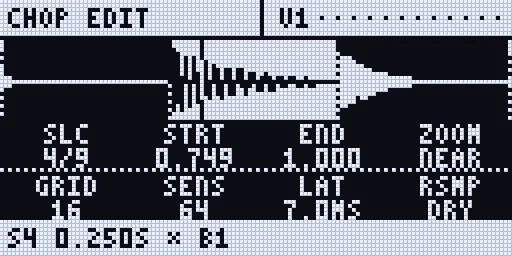
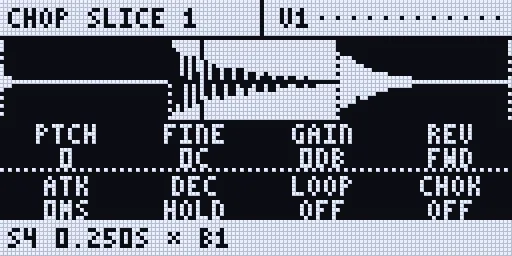
Renders of the Rytm-screen pages: the Sidecar’s own page code on the host, with made-up data.
Per-slice settings
Section titled “Per-slice settings”| Setting | Range | |
|---|---|---|
| PTCH / FINE | -24..+24 semitones / -50..+50 cents | |
| GAIN | -24..+12 dB | |
| REV | FWD / REV | |
| ATK / DEC | 0..2000 ms / HOLD .. 10 s | |
| LOOP | OFF / FWD / PING | while held |
| CHOK | OFF, G1..G4 | slices in a group cut each other |
| NUDG | -50..+50 ms | the start moved, the end kept |
| STUT / SLEN / SDEC | x1..x16 / 1..100 % / 0..90 % | the slice’s first part repeated, each repeat quieter |
| TAPE / TTIM | OFF / STOP / SPIN, 20 ms .. 4 s | the pitch falls to zero at the slice’s end, or rises from zero at its start |
| NBR | 0..100 % | the chance that a hit plays a neighbour instead |
On the touchscreen
Section titled “On the touchscreen”A CHOP track’s VOICE page (UP + T4) is a chop screen:
- the waveform, large, with numbered markers: drag a marker to move it, tap a slice to select it, drag elsewhere to scroll, ZOOM - / +;
- 16 pads with bank tabs A..D: a tap selects and plays a slice (in LAZY: a tap drops a marker);
- the slice list: each slice’s start, length and settings; the arrows move the cursor, - / + edit;
- keys: LAZY (again: STOP), TAP, UNDO, GRID (4 8 16 32), TRANS, ADD, DEL, RSMP.
The weird tools
Section titled “The weird tools”- SHUFFLE (SEED): the slices in a shuffled order, the same for the same seed. A scene or PERF lock on SEED changes it live. RSET (the editor’s SLICE 2, push H) puts the order back.
- STUTTER and TAPE STOP / SPIN-UP per slice, or per hit from page 2.
- MORPH (MRPH): the slice crossfaded with the next one while it plays.
- NEIGHBOUR CHANCE: some hits play the slice next door, repeatably.
- RESAMPLE SLICE (the editor’s push H): the slice is played once through its voice’s inserts (with +FX, the send effects too) and recorded into the SAMPLES pool. YES then makes the recording the slice’s own sample; NO keeps the old one.
Limitations
Section titled “Limitations”- Sidecar (Pi) only: the Sidecar Mini has no CHOP.
- The CHRO pads start at SLC, not always at slice 1.
- No live source yet (recording trigs into memory to chop): planned.
- Pinch to zoom is not built on the touchscreen: use ZOOM and drag.