Insert FX and FX buses
Every Sidecar voice gets an INSERT chain of two slots, A and B, before it goes back into the Rytm’s track. Three FX buses take sends from the voices. in testing
Signal flow
Section titled “Signal flow”Sidecar voice -> INSERT A -> INSERT B -> OUT: TRK the Rytm's track (analog filter, amp) PRE the Rytm's main mix, before its master FX (stereo) POST the Rytm's main mix, after its master FX (stereo) \-> sends to bus 1, 2, 3bus 1 = SEND FX 1 -> its chain (A, B) -> PRE or POSTbus 2 = SEND FX 2 -> its chain (A, B) -> PRE or POSTbus 3 = dry -> its chain (A, B) -> PRE or POST (ROUTE)- Buses 1 and 2 are the two send effects: their TYPE, P1..P5 and the Rytm tracks’ sends are unchanged. A kit without insert settings sounds exactly as before.
- Bus 3 has no send effect of its own: a dry bus of the voices’ sends through its two slots (a bus compressor, a shared filter, …).
- A voice’s sends are taken after its inserts: the bus hears the inserted voice, not the Rytm’s analog processing of it.
- The OUT route decides where the voice goes after its inserts: its own track (TRK, the default) or the Rytm’s main mix in stereo, before (PRE) or after (POST) the Rytm’s master distortion and compressor. On PRE and POST the insert chain runs in stereo. See Stereo and the OUT route.
Effects
Section titled “Effects”| TYPE | P1 | P2 | P3 | P4 |
|---|---|---|---|---|
| FILTER | CUT 20 Hz..20 kHz | RES | MODE LP > BP > HP | DRV 0..+24 dB |
| CRUSH | RATE | BITS 16..2 | DRV 0..+18 dB | MIX |
| DRIVE | DRV 0..+30 dB | SHPE saturation > fold | TONE | MIX |
| EQ | LOW shelf ±15 dB | MID bell ±15 dB | HIGH shelf ±15 dB | FREQ (the bell) 200 Hz..8 kHz |
| COMP | THR 0..-40 dB | RAT 1..20 | SPD (attack and release) | GAIN 0..+24 dB |
| DELAY | TIME 1..80 ms | FDBK | MOD | MIX |
| TREMOLO | RATE 0.1..20 Hz | DPTH | SHPE sine > square | PAN |
| RINGMOD | FREQ 10 Hz..5 kHz | SHPE sine > square | MOD | MIX |
| AMP (0.3.0) | MODL: an amp capture from /NAM/ |
GAIN -18..+18 dB into it | TONE tilt ±6 dB | LEV -36..+6 dB |
| SAT (0.4.0) | CHAR: TAPE, CONS, SOFT | DRV 0..+24 dB | TONE tilt ±6 dB | MIX |
Changing TYPE crossfades without a click and loads the effect’s defaults. Parameters are smoothed, so p-lock jumps do not zipper.
SAT: tape, console, soft
Section titled “SAT: tape, console, soft”hardware New in 0.4.0. SAT is a saturator for any slot: a voice, a bus, the master chain. CHAR picks its character:
- TAPE: the highs saturate first, the lows get a small bump around 100 Hz as DRV goes up.
- CONS: clean for longer, then a firmer edge, as a console channel pushed.
- SOFT: a plain round curve.
DRV is how hard it is driven, and the level stays about the same for a signal around -12 dBFS; louder input comes out quieter. TONE tilts the result around 1 kHz. MIX blends it with the dry signal in time, so MIX in between does not comb.
DRV 0 or MIX 0 is exactly the dry signal. Anything above adds 15 samples of delay (0.3 ms). The curve runs at four times the sample rate, which keeps aliasing down; a loud high note at full DRV still has some. Changing CHAR crossfades without a click, and it takes p-locks and LFOs.
AMP: amp captures (NAM)
Section titled “AMP: amp captures (NAM)”in testing New in 0.3.0. AMP puts a real amp on a Sidecar voice: a Neural Amp Modeler (NAM) capture of a guitar amp, pedal or preamp, run by TONE3000’s NAM A2-Lite engine. Pick AMP as a slot’s TYPE, then pick a capture with MODL. Drive a kick, a bass or a synth through it.
| Knob | Label | What |
|---|---|---|
| P1 | MODL | the capture: the files in the card’s /NAM/ folder, in name order, spread over the knob. It shows the file’s short name (PLEXICR) |
| P2 | GAIN | -18..+18 dB into the capture (64 = 0 dB): more drive |
| P3 | TONE | a tilt after it, -6..+6 dB around 650 Hz (64 = flat) |
| P4 | LEV | the output, -36..+6 dB (109 = 0 dB) |
Every knob takes p-locks and LFOs, MODL too: a lock can change the amp per step. A new capture loads in the background: the slot keeps playing the old one (or dry) until the new one is ready, then crossfades to it in 10 ms. A capture used before comes back at once.
Add your own captures
Section titled “Add your own captures”- Get A2-Lite captures from TONE3000: thousands of amps and pedals. Download the A2 version: its
*_a2.namfile holds an A2-Lite model, and the Sidecar takes that one. Older NAM models (A1 “Standard”, “Lite”, “Feather”, “Nano”, A2-Full, LSTMs) are refused: the Sidecar plays A2-Lite only. - Copy them into
/NAM/on the Sidecar’s card: on the web page’s Files tab (upload into theNAMfolder; make it with New folder if it is not there), or with the card in a computer. - Rescan: the list is read again when you type
amp=rescanon the web page’s console (Log & console), and at the next start. - Pick AMP in an insert slot (Editing) and turn MODL.
- Formats:
.nam(NAM’s own JSON, including TONE3000’s A2 downloads) and.namb(TONE3000’s binary format). Captures at 48 kHz only (or with no rate in the file). - Limits: up to 64 files, names up to 47 characters, a file up to 512 KB.
- Names: the knob shows the first 7 letters of the file name, upper case, without spaces,
_and-(Plexi Crunch.namshowsPLEXICR). Name your files so the first 7 letters tell them apart. - The kit remembers the file by name, so adding files later does not change which amp a kit plays. A file that is gone is logged, and the knob keeps its value.
- A2 “Amp + Cab” captures include the speaker cabinet. An “Amp Head” capture has no cab; a cab after the amp is planned.
MODL’s text shows on the Rytm’s INSERT page and on the touchscreen’s INSERT FX page.
What MODL shows when it cannot play (the slot then passes the voice through TONE and LEV, dry):
| Text | Meaning |
|---|---|
PLEXIC~ |
that capture is loading |
LOADING |
the /NAM/ folder is being read |
NO NAM |
no .nam or .namb file in /NAM/ |
NOTLITE |
not an A2-Lite model (or a file over 512 KB) |
BADFILE |
a damaged or cut-short file, or not a NAM model |
NOT 48K |
a capture made at another sample rate |
MAX 6 |
six AMP slots play already |
NO RAM |
no memory for it |
Where and how much: on the voices’ chains only (not on the buses). AMP is mono: on a stereo voice (OUT PRE / POST) it plays the sum on both sides. At most 6 AMP slots play at once: one costs about 4 % of a Pi 4 core (measured by the boot bench); a seventh shows MAX 6 and plays dry.
Editing
Section titled “Editing”- On the Rytm: UP + FX opens the remote page INSERT (or INSERT FX in the SIDECAR MENU; TRK + FX, the older form, still works). The TRACK view shows the selected track’s voice: a strip
[A TYPE] > [B TYPE] > [OUT], A..D the slot’s P1..P4, E SLOT, F TYPE, G BUS, H SEND. FUNC + G picks another track. YES: the BUS view (A..D, E SLOT, F TYPE, G BUS 1..3, H ROUTE for bus 3); YES again: the OUT view (A OUT, B LEV, C PAN, D WID, E DEC); NO goes back. UP + AMP opens the page straight on the selected track’s OUT view. RIGHT, from any of its views, opens the EQ view: a post EQ after the two slots, A HPF, B LPF, C LOW, D HIGH (LEFT or NO goes back; YES swaps between the voice’s EQ and its bus’s). The EQ has no p-locks.
The INSERT page replaces the Rytm’s page like SRC: no page dots and no LEFT / RIGHT siblings. Leave with NO, or press UP + FX again; UP + AMP again aims the OUT view at the track now selected.
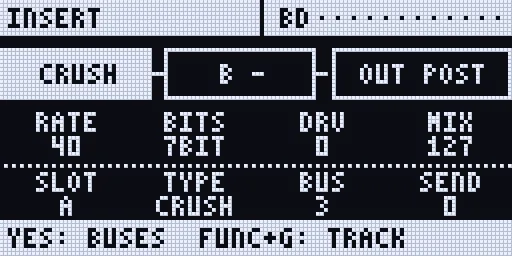
Render of the Rytm-screen page: the Sidecar’s own page code on the host, with made-up data.
- On the touchscreen: the INSERT FX page (FX, UP + T6 on the Rytm, or Settings > Send FX > Inserts): the voice’s two slots as dials with their values, a key per track, the three sends, each bus’s chain and return, and the OUT row (TRK / PRE / POST, LEV, PAN, WID). It follows the Rytm’s selected track; the knobs are the Rytm’s (
KNOBS ON RYTM), the TYPE and OUT keys edit. - P-locks: on a poly track, hold trigs and press FX twice: the INS lock page (A..D INSERT A P1..P4, E..H INSERT B P1..P4).
- LFOs: targets I1..I8 (the voices’ chains) and B1..B3 (the buses’ chains), on top of the knob or lock; O1..O8 move the OUT route’s LEV, PAN and WID (LFOs).
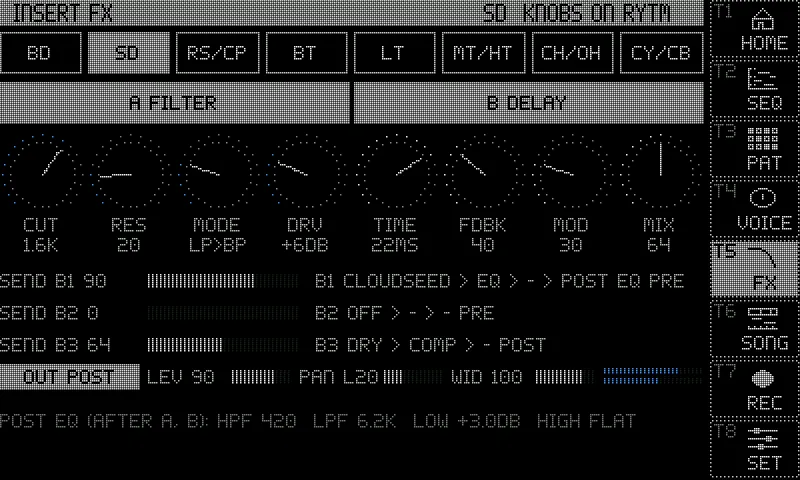
Screenshot: rendered off-device by the Sidecar’s own page code, with made-up data.
Settings, the OUT route included, are saved per kit on the Sidecar’s card (/.rytm/ins/<project>/kNNN.txt), a second after the last edit. They follow the Rytm’s kit SAVE and RELOAD (YES + KIT / NO + KIT, or the KIT menu): a saved kit’s insert settings come back when you reload it (Saving and reloading).
Limitations
Section titled “Limitations”- Sidecar (Pi) only.
- The web page shows the chains (in its status) but has no editor for them yet.
- Insert locks exist only on poly tracks.
- CPU: 8 voices with two slots each cost about 1.3 to 2.2 % of a Pi 4 core (estimated from the Mac). AMP costs about 4 % of a core a slot, at most 6 at once.
- AMP: A2-Lite captures at 48 kHz only; no cab IR after the amp yet.