Stereo and the OUT route
Every Sidecar voice normally comes back on its own Rytm track, in mono, through the track’s analog filter and amp. The OUT route can send it past the track instead: straight onto the Rytm’s main mix, in stereo. in testing
TRK, PRE and POST
Section titled “TRK, PRE and POST”| OUT | Where the voice goes | The track’s FLTR, AMP, OVER, VOL, PAN, DEL, REV | The Rytm’s master distortion and compressor | Stereo |
|---|---|---|---|---|
| TRK (default) | its own track, as before | yes | yes | no |
| PRE | the Rytm’s main mix, before the master effects | no | yes | yes |
| POST | the Rytm’s main mix, after the master effects | no | no | yes |
- On PRE and POST a stereo sample plays in stereo (DSP SAMPLE, MULTISAMPLE, GRANULAR); every other machine plays centred. The voice’s insert effects run in stereo too.
- Switching OUT crossfades over 8 ms, without a click. A held note keeps sounding; expect a step in level.
- OUT is saved per kit, with the inserts. It cannot be p-locked.
What changes on PRE and POST
Section titled “What changes on PRE and POST”Left out: the track’s filter, amp envelope, overdrive, volume and pan, and the Rytm’s delay and reverb sends (the Sidecar can reach the Rytm’s effect returns, not its effect inputs).
Still works:
- The track’s FX1 / FX2 send knobs still feed the Sidecar’s send effects: the voice stands in for its silent track.
- The insert page’s bus sends (bus 1, 2, 3), as before.
- Mute. A muted track fades its PRE / POST voice out in 5 ms (and back in when unmuted). On a shared voice (RS/CP, MT/HT, CH/OH, CY/CB) the Rytm’s own trigs mute it when both of its tracks are muted.
- Envelopes. MULTISAMPLE, GRANULAR and the synth machines have their own. DSP SAMPLE has none (the Rytm’s AMP shaped it): on PRE / POST it plays to the sample’s end or the note-off, and DEC shortens it like the AMP’s decay.
The OUT settings
Section titled “The OUT settings”| Setting | What | Range |
|---|---|---|
| OUT | TRK / PRE / POST | |
| LEV | the voice’s level on PRE / POST | 0..127, 100 = unity |
| PAN | a stereo voice’s balance, a mono voice’s pan | L64 .. C .. R63 |
| WID | stereo width | 0 mono, 64 as the sample, 127 the sides twice |
| DEC | DSP SAMPLE’s decay on PRE / POST | OFF, 20 ms .. 10 s |
LEV, PAN and WID are LFO targets: O1..O8.
Where to set it
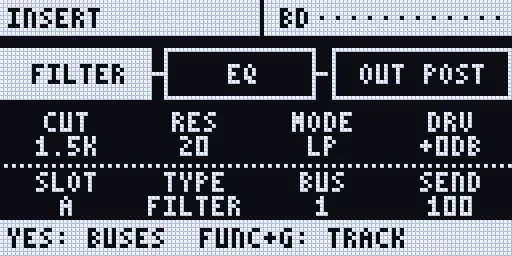
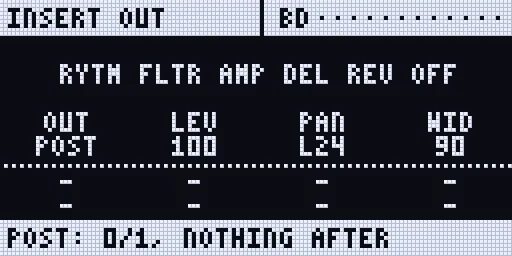
Section titled “Where to set it”- On the Rytm: UP + AMP opens the remote INSERT page straight on the selected track’s OUT view (again while open: back to that view). Or UP + FX for the INSERT page (TRK + FX, the older form, still works). The TRACK view’s strip ends in the OUT box (
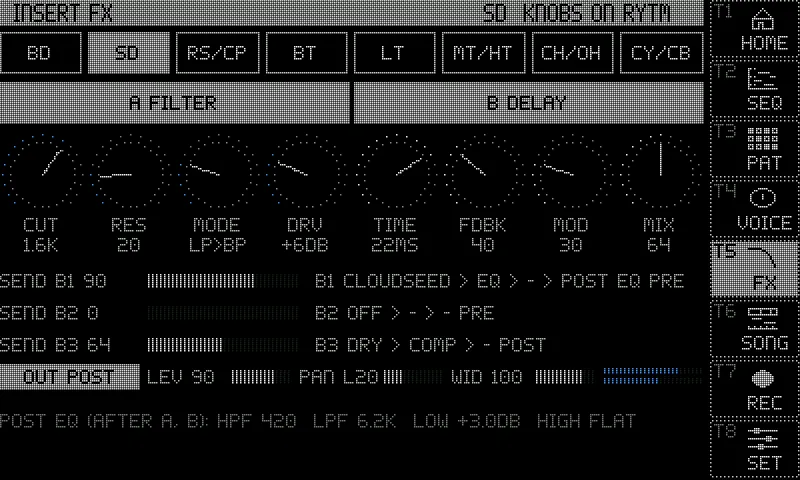
OUT POST). Press YES twice (TRACK > BUS > OUT) for the OUT view: A OUT, B LEV, C PAN, D WID, E DEC (DSP SAMPLE only). The line under the title says what is left out. YES or NO goes back. - On the touchscreen: the INSERT FX page (UP + T6): the OUT row. Tap the key to step TRK > PRE > POST; LEV, PAN and WID with their values, and the voice’s L / R meters while it is on PRE / POST.
- On the console:
out=V3:post,out=V3:lev:100,out=V3:pan:64,out=V3:wid:64,out=V3:dec:off,out=list.
Stereo samples
Section titled “Stereo samples”The pool keeps a file’s channels: a stereo file is stereo in memory (twice the memory of a mono one); a file with three or more channels keeps its first two. On TRK every machine plays the sum of the two channels, exactly as before. The pool lists tag each sample ST or M (Pools).
- MULTISAMPLE reads the
.sfzregions’pan,widthandpositionon PRE / POST. - GRANULAR on PRE / POST reads a stereo source’s two channels and pans each grain at random within SPRY x WID (WID 0: no spread). Its live inputs stay mono.
poolmono=1incmdline.txtsums stereo files at load: half the memory; PRE / POST voices then play them centred.
Send and insert FX
Section titled “Send and insert FX”- The voice’s insert chain runs before the route: in stereo on PRE / POST, in mono on TRK.
- Its bus sends are taken from the voice’s mono sum.
- The send effects keep a mono input: a PRE / POST voice feeds them through its track’s FX1 / FX2 knobs as if it were the track’s own output.
The streaming budget
Section titled “The streaming budget”MULTISAMPLE streams its samples from the card, with their first half second in memory; stereo streams cost twice the reading of mono ones. Each drive has a streaming budget: how many streams it carries with a margin, from what was measured on it (the storage bench, and for the SD card also the SD card test), or a cautious default.
- A stereo MULTISAMPLE instrument whose drive cannot carry 8 of its voices is held in memory instead, when it fits. Its row says
RAM (BUDGET). - Always in RAM: hold a row, or a whole list, in memory whatever the budget says (short loops, hard-hit material):
pool=inst:ram:A003:on,pool=smp:ram:all:on(:offtakes it back). The web page’s Pool tab marks such a row RAM. streamon the console prints every drive’s budget (stereo and mono 24-bit 48 kHz streams).- A change acts at the instrument’s next load.
Recording
Section titled “Recording”A voice on PRE / POST when a take starts records its own file in stereo (13_VOICE1.wav .. 20_VOICE8.wav). Two more recorder sources carry the pairs as sent: 23 PRE and 24 POST (the web page’s record list, or rec=ch:+pre,+post). The sampler’s “Sidecar voice” source records stereo for a voice on PRE / POST.
Measurements (pending)
Section titled “Measurements (pending)”How the Rytm handles the two returns has not been measured on a real Rytm yet; the defaults follow the design. The Sidecar measures it itself. To help, with a Rytm and a Sidecar running this build:
- Connect the Rytm (Overbridge, as for playing) and stop it. Set the master effects neutral (distortion 0, compressor off). Note the Rytm’s USB audio settings.
- On the console:
stereo=measure. It plays test tones and an impulse for about 4 s and reads them back from the Rytm’s MAIN L/R. Thenstereo=result. - With a track: put a Sidecar machine on BD (voice 1), FLTR open (LP, cutoff max, RES 0), OVER 0, AMP ATK 0 / HOLD max / DEC max, VOL 100, PAN centre, DEL and REV sends 0. Trigger BD once, then
stereo=measure:trk:1(about 6 s) andstereo=result. It suggests trims that make LEV 100 on PRE / POST as loud as the same voice on TRK. - Repeat for each of the Rytm’s USB IN routing settings.
- Keep the trims with
trimpre=/trimpost=incmdline.txt(tenths of a dB), orstereo=trim:pre|post:Nfor the session. - Send the
stereo=resultlines and the settings you used with a tester report.
If a result says (NOT IN MAIN IN), that return does not reach what the Rytm sends back as MAIN L/R: the recorder’s MASTER and the sampler’s MAIN would then miss PRE / POST voices. Please report it.
Limitations
Section titled “Limitations”- Sidecar (Pi) only. Not yet measured on a real Rytm (above).
- Not built yet: an amp follower for DSP SAMPLE on PRE / POST (only DEC for now), GRANULAR’s live inputs in stereo, stereo-input send effects.
- The touchscreen’s REC page has no cells for PRE / POST: use the web page or the console.
- A take’s stereo voice files follow the routes set when it is armed, not when PLAY starts it.
- With POST voices the main outputs can reach about -6 dBFS before the send FX returns.