Song recorder
The Rytm’s song mode is a list of patterns. The song recorder captures a whole performance instead: arm it, press PLAY on the Rytm and play. Pattern changes, knob moves on every track, mutes, scenes, PERF and the Sidecar’s own send FX are recorded against the Rytm’s step clock. Replay puts the Rytm back where the take began and plays it again. in testing
Set the Rytm up once
Section titled “Set the Rytm up once”GLOBAL > MIDI CONFIG (the Sidecar reads these settings, never changes them):
- PORT CONFIG: ENCODER DEST = INT+EXT, OUTPUT CH = TRK CH, PARAM OUTPUT = NRPN.
- SYNC: PROG CH RECEIVE and PROG CH SEND on, TRANSPORT SEND on.
The SONG pages say what is missing (! ENCODER DEST INT, OUTPUT CH AUTO); CFG on the touchscreen or T4 on the Rytm’s SONG page show the steps.
Record
Section titled “Record”- Arm: the touchscreen’s SONG page, ARM; or the Rytm’s remote SONG page, T1. Arming reads the Rytm’s start state (working kit, pattern, settings).
- Press PLAY on the Rytm and perform. T3 drops a marker.
- STOP on the Rytm ends the take:
/.rytm/songs/<project>/take-NNN.json. A take cut by a power loss is recovered the next time the Rytm names that project.
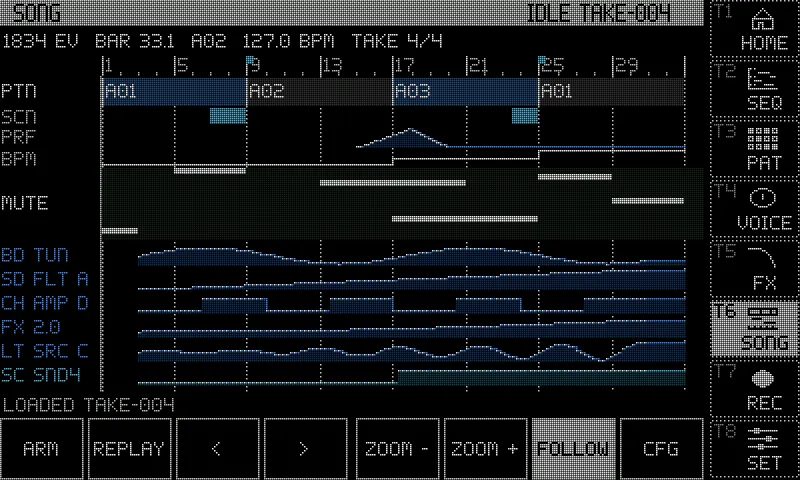
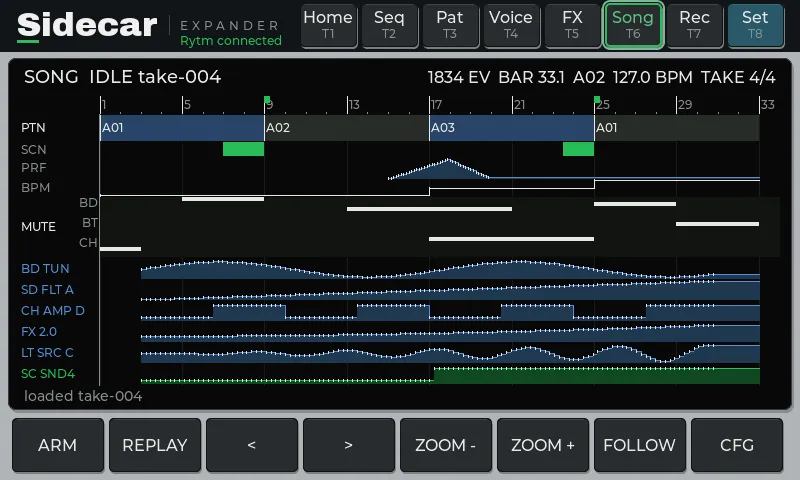
The touchscreen’s SONG page is the take as a timeline (read only): bars and markers, pattern blocks, scenes, PERF, tempo, the 12 mutes, and the parameter lanes that moved most (Rytm in blue, Sidecar in teal). Drag scrolls; - / + zoom; FOLLOW keeps the playhead in view; < > load the project’s other takes.
Replay
Section titled “Replay”- Stop the Rytm. REPLAY (touchscreen) or T2 (Rytm).
- Nothing is written until you CONFIRM (touchscreen) or press YES (Rytm). The Sidecar first backs up the Rytm’s working kit, pattern and settings (
.backup-NNN.json), then writes the take’s start pattern and kit into the Rytm’s working buffers (never a stored slot, never a save), sets the mutes and its own send FX, and checks what it wrote. - Press PLAY on the Rytm. Pattern changes, knobs, mutes and scenes come at their recorded steps. STOP ends it. CANCEL / NO backs out at any point before PLAY.
Undo a replay
Section titled “Undo a replay”A replay overwrites the Rytm’s working kit, pattern, settings and mutes. UNDO REPLAY puts everything back, as it was before you confirmed. in testing
- Touchscreen: the UNDO REPLAY key in the place of < > while it is offered. Rytm: T5 on the SONG page (the page says
T5: UNDO REPLAY). - How it works: when you confirm a replay with the Rytm stopped, the Sidecar first reads and saves every pattern the take visits (with the kit each links), about 0.3 s per pattern, then writes. One press of UNDO REPLAY puts back your kit, pattern, settings and mutes, and the Rytm ends on the pattern you were on.
- How long it is offered: from the replay’s first write until you change something (a knob, a mute, a pattern change on the Rytm, the Sidecar’s send FX, ARM), until 30 seconds after the Rytm stops, or until you change project. After that T5 says
UNDO EXPIREDfor a second. - At most 8 patterns. A take that visits more is covered at its start only (the page says
UNDO will cover the start only), and the undo ends when the replay leaves its start. If the Rytm switches to a pattern that was not saved (a chain on the Rytm, a pattern you select), the undo ends at once. - Press PLAY during an undo and it stops (it never writes into a playing pattern); the undo stays offered. The undo is not offered after a restart of the Sidecar. Trig edits you make on the Rytm are not seen by the Sidecar, so the 30-second limit covers them.
- This is separate from the poly sequencer’s UNDO: that one undoes notes, this one puts back the Rytm’s kits and patterns.
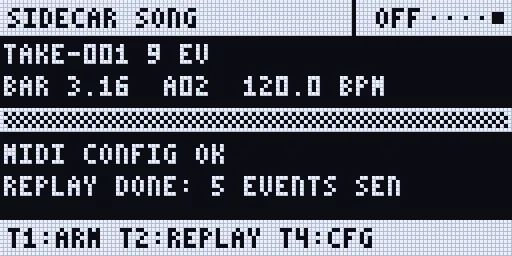
Screenshots: rendered off-device by the Sidecar’s own page code, with made-up data.
UP + T11 opens SONG: on the touchscreen when one is connected, else the Rytm’s SONG page. The Rytm’s SONG page is also in the SIDECAR MENU (UP + YES, then YES), listed once a take exists on the card or the touchscreen armed one.
With poly tracks and the pools
Section titled “With poly tracks and the pools”- Poly tracks keep their notes in the pattern’s file on the Sidecar; when a take changes pattern, they play that pattern’s steps.
- GRANULAR SRC, WAVETABLE TBL and MULTISAMPLE INST are recorded with their bank, from the Sidecar’s own reports (not the Rytm’s CC / NRPN), and replayed as a knob turn.
Limitations
Section titled “Limitations”- Not replayed: tempo (the replay follows the Rytm’s own tempo), FILL, trig, p-lock and pattern edits, sound loads, machine changes from the menu, LFO phase.
- Scenes and PERF on replay are not tested on hardware.
- Takes are numbered, not dated (the Pi has no clock).
- While a take records, the Rytm’s SONG page updates about once a second and the touchscreen’s PAT and VOICE pages fetch the Rytm’s pattern only after STOP, to keep the Rytm’s own UI responsive.