Sampler and auto-sampler
The sampler
Section titled “The sampler”One take to the card, from: in testing
| Source | |
|---|---|
| IN L/R | the Rytm’s AUDIO IN, stereo |
| MAIN | the Rytm’s main mix (resampling everything, the Sidecar’s voices and send FX included) |
| A Rytm voice | BD SD RS/CP BT LT MT/HT CH/OH CY/CB, mono |
| A Sidecar voice | as rendered, mono |
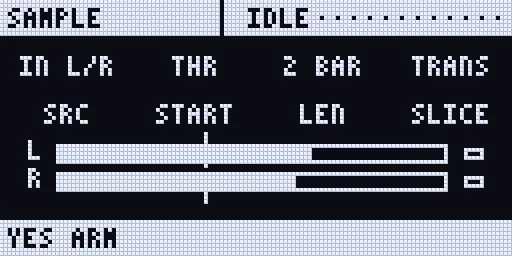
- Start: now, a threshold (dBFS), the Rytm’s PLAY, or its next bar. A pre-roll of up to 1 s is kept from before the start.
- Length: free (until stop; at most 120 s), or N bars cut exactly at the Rytm’s clock.
- Processing: free takes are trimmed and normalised to -1 dBFS; 24-bit 48 kHz WAV.
- Slices: by transients or a grid of N, written as an
.sfzslice map next to the WAV. - Files:
/Samples/<project>/<name>.wav(and the slices). - Into the pool: the take goes into the project’s SAMPLES POOL, the first free row of the bank last shown (bank A by default, else the next bank with room); the page says
TAKE -> A012. GRANULAR and CHOP can pick it from there (DSP SAMPLE after the next boot). Its slice map goes into INSTRUMENTS the same way, for MULTISAMPLE.
On the Rytm: the remote page SAMPLE, next to SCOPE (UP + T7 opens it). A source, B start, C bars, D slices; YES arms, records and stops; A pushed cancels. The page shows the level, the take’s time, the last take and the tempo.
On the web page: Record tab, Sample.
The auto-sampler
Section titled “The auto-sampler”Plays notes, records them, trims, finds loops and writes a MULTISAMPLE instrument (/MULTISAMPLE/<name>/<name>.sfz and its WAVs). It goes into the project’s INSTRUMENTS pool by itself, ready for INST. in testing
| SRC | Plays | Records |
|---|---|---|
| 6-OP FM | a DX7 voice (PATCH) | rendered offline, faster than real time: you hear nothing (the page says OFFLINE) |
| JUNO | a JUNO patch | offline, as above |
| VOICE | a copy of what Sidecar voice 1..8 plays now | offline, as above |
| TRK | one of the Rytm’s 12 tracks, by a note on its MIDI channel | the track’s Overbridge stem, in real time |
| EXT | an external synth: MIDI notes on USB (the computer on the Sidecar’s USB-C), DEV (a USB MIDI device on the Pi’s USB-A) or RYTM (the Rytm’s USB MIDI), channel 1..16 | the Rytm’s AUDIO IN L, R or L+R, in real time |
- Plan: notes LO..HI every STEP semitones, velocity layers (1..8), round robins (1..4), the hold time, the release tail, the gap.
- One gain for the whole instrument (velocity layers keep their relation), zones split between the sampled notes, loops found on sustained sounds, silent takes left out.
- On the Rytm: the remote page AUTO (UP + T7 twice): A SRC, B the entry (PATCH, VOICE, TRACK or the MIDI output and channel; push B for EXT’s input L+R / L / R), C LO, D HI, E STEP, F LAYER, G RR, H HOLD. YES starts; A pushed cancels after the current note. The bottom bar shows the progress (
C4 v100 3/24). - On the web page: Record tab, Auto-sampler.
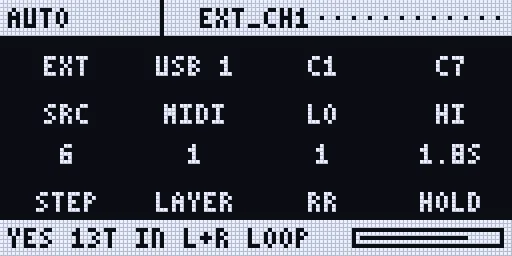
Screenshots: rendered off-device by the Sidecar’s own page code.
Limitations
Section titled “Limitations”- Sidecar (Pi) only.
- EXT on USB needs the Sidecar’s USB-C MIDI to the computer, which only the Pi 4 has for now; your DAW routes the notes to the synth. On a Pi 5 use DEV.
- EXT on RYTM reaches a synth only if the Rytm passes USB MIDI on to its MIDI OUT; not confirmed.
- TRK: RS/CP, MT/HT, CH/OH and CY/CB share one stem each.
- DSP SAMPLE sees a new take only after the next boot.
- No touch slicing page yet.