Pools and the sample library
Every project has three POOL lists: the sounds its tracks pick from, in fixed rows. The Rytm’s knob stores a row, never a file name, so a kit or a p-lock plays the same row whatever you load. in testing
The three lists
Section titled “The three lists”| List | Used by | A row holds |
|---|---|---|
| SAMPLES | GRANULAR’s SRC, DSP SAMPLE’s SMP, the sampler’s takes | a WAV or AIFF file, a live input, a built-in |
| WAVETABLES | WAVETABLE’s TBL | a WAV or AIFF file (any sample can be a table), a built-in |
| INSTRUMENTS | MULTISAMPLE’s INST, the auto-sampler, the sampler’s slice maps | an .sfz instrument with its samples |
Each machine sees only its own list.
- 8 banks, A..H, of 128 rows. Row 000 of every bank is OFF (silence); rows 001..127 are yours. Rows never move: loading never renumbers, unloading leaves an empty row, and a lock on an empty row plays silence.
- One row per file. Loading a file that is already in the list goes to its existing row (
IN POOL C004on the Rytm,IN C001on the touchscreen); nothing changes. - Inputs and built-ins are rows without a file. SAMPLES: the live inputs
IN MAIN BD SD RS-CP BT LT MT-HT CH-OH CY-CB(GRANULAR only; silent on DSP SAMPLE) andPAD BELLS. WAVETABLES:BASIC PWM VOCAL ORGAN FM SYNC. They come from the browser’s@INPUTS/and@BUILT-IN/folders. To put a file in such a row, unload it first.
A new project starts with:
| List | Rows |
|---|---|
| SAMPLES | H001..H010 the ten inputs, H011 PAD, H012 BELLS; bank A empty |
| WAVETABLES | A001..A006 BASIC PWM VOCAL ORGAN FM SYNC |
| INSTRUMENTS | empty |
A new GRANULAR track points at A010 (empty, silent until you load something), WAVETABLE at A001 (BASIC), MULTISAMPLE at A000 (OFF).
Choosing and loading on the Rytm
Section titled “Choosing and loading on the Rytm”The bank list. On the SRC page of a GRANULAR, WAVETABLE or MULTISAMPLE track, turn knob A. On a DSP SAMPLE track, turn SMP (knob D of its SMPL page). Or press UP + SRC on any of these tracks: the list opens in one press. The list opens: tabs < A B C D E F G H >, rows A000 OFF, A001 name, and the row under the cursor with its state.
| Key | In the list |
|---|---|
| LEFT / RIGHT | the bank |
| the knob, UP / DOWN | the row |
| YES | choose the row |
| NO | cancel, nothing changes |
| YES with trigs held (GRID REC) | lock the row on those steps |
| FUNC + YES | open the card’s browser, aimed at the row under the cursor |
FUNC + YES works in every bank. The browser’s root shows the list’s virtual folders (@INPUTS/, @BUILT-IN/) and the card’s folders; a folder shows its subfolders and the files the list takes (.wav .aif .aiff, or .sfz for INSTRUMENTS). YES on a folder opens it, YES on a file puts it in the row (SET C005), NO goes up. Resting the cursor on a file already in the list previews it.
Refused, with the reason: row 000 (000 IS OFF), an input or built-in row (BUILT-IN: UNLOAD FIRST), a locked list (POOL LOCKED). A row in use asks first (below).
The bank is part of the knob’s value, so it is saved in the kit and in p-locks, also over a power cycle. An old kit’s DSP SAMPLE SMP reads as bank A.
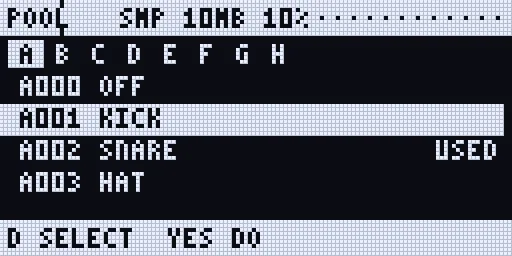
The POOL page on the Rytm
Section titled “The POOL page on the Rytm”A remote page for the whole pool: UP + T13 (with a touchscreen connected, its POOL page opens instead), or POOL in the SIDECAR MENU (UP + YES, then YES). Its header shows the list and the pool RAM. The page replaces the Rytm’s page like SRC: no page dots, and LEFT / RIGHT do nothing on it. Leave with NO.
| Control | Does |
|---|---|
| knob A | the list: SAMPLES / TABLES / INSTR |
| knob B | the bank A..H |
| knob C, UP / DOWN | the row (FUNC: 8 at a time) |
| knob D | the action: SELECT, UNUSED, ALL, NONE, UNLOAD, REPLACE, UNDO |
| YES | does the action |
- SELECT toggles the row, ALL selects the bank’s filled rows, NONE clears the selection.
- UNUSED selects the rows that hold a file and were never seen playing in this project (see the warning below).
- UNLOAD empties the selection (or the row). The file stays on the card.
- REPLACE opens the list’s browser aimed at the row: YES on a file puts it in the row.
- UNDO brings back the last replace or unload of that list.
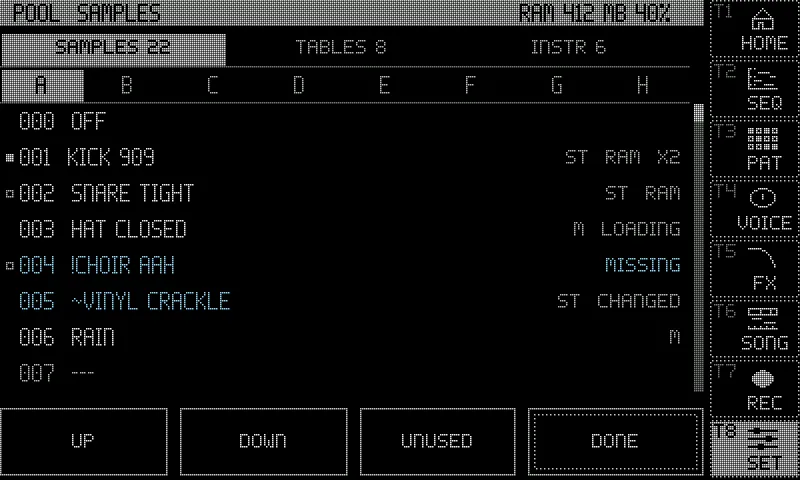
Rows show RAM, LOADING, MISSING, CHANGED, LIVE, BUILT-IN or the size, and USED for a row in use.
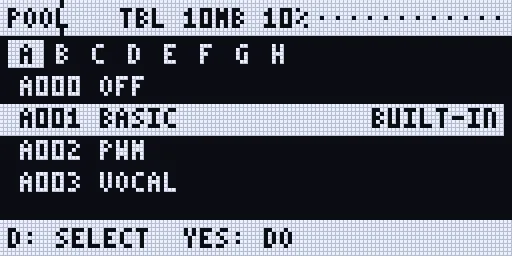
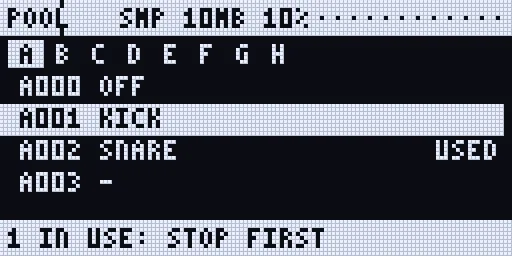
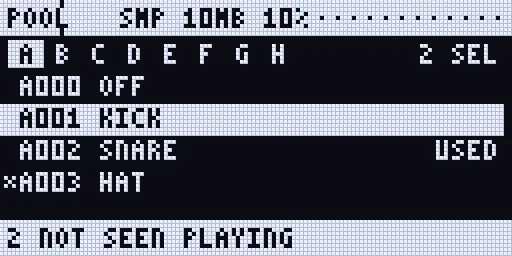
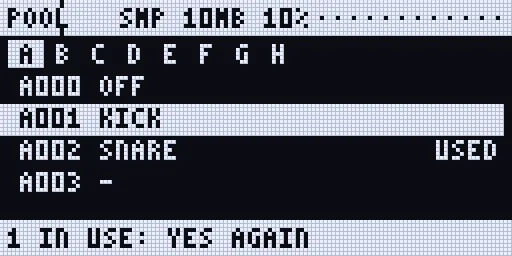
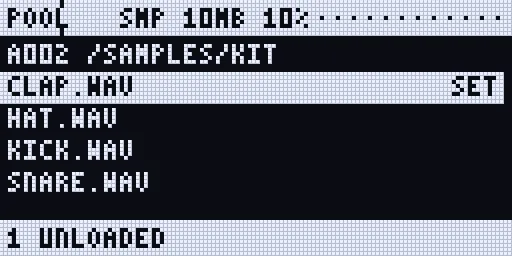
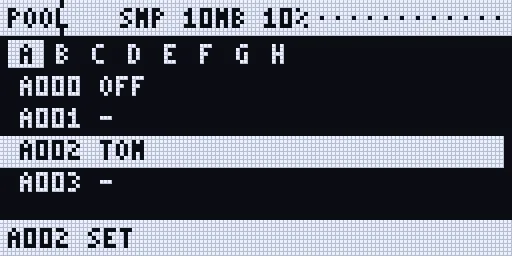
Renders of the Rytm-screen pages: the Sidecar’s own page code on the host, with made-up data.
On the touchscreen
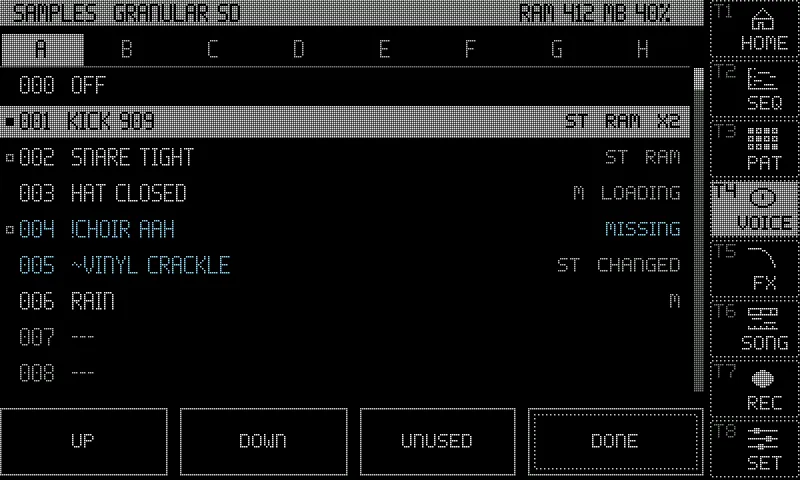
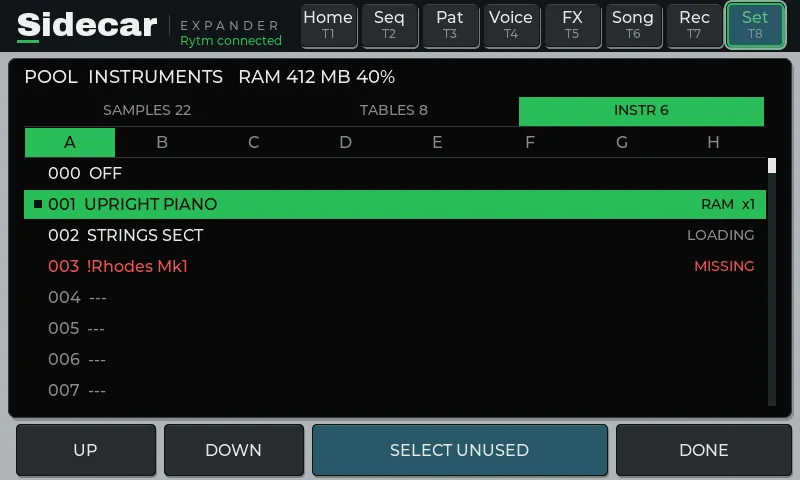
Section titled “On the touchscreen”- The machine view’s POOL (UP + T4 on a GRANULAR, WAVETABLE or MULTISAMPLE track, then POOL): the voice’s own list, tabs A..H, its rows with their states, and the pool RAM in the title. Tap a filled row: the voice plays it. Tap an empty row: FILES aimed at it (a file goes in, then the next empty row is aimed at), or FILL the bank’s empty rows from a folder, in name order (SAMPLES and WAVETABLES).
- Long press a filled row: REPLACE, UNLOAD, ACCEPT (a changed file). UNDO shows in the message row after a change.
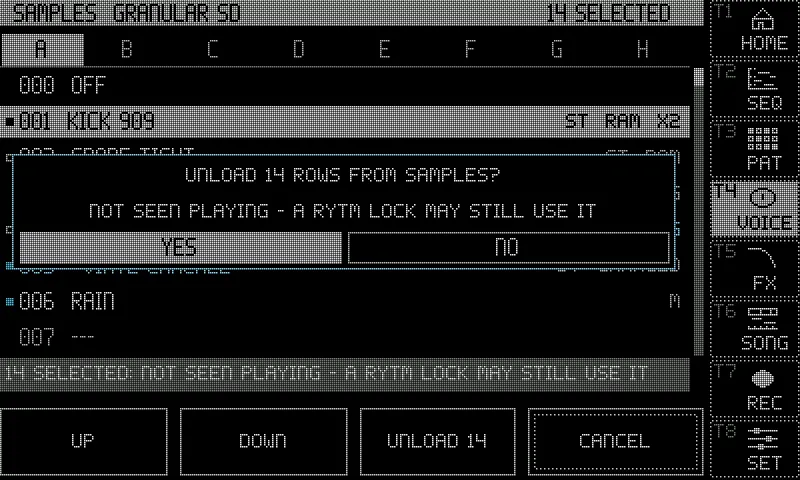
- UNUSED: the rows not seen playing, selected, with the warning; UNLOAD N asks first.
- ALL POOLS (or Settings > Pool) opens the POOL page: the same, with the three lists as tabs and their counts.
A row in use carries a mark: filled when voices play it now (X3: three voices), an outline when it was seen playing in this project.
On the web page
Section titled “On the web page”The Pool tab at sidecar.local: SAMPLES / WAVETABLES / INSTRUMENTS, banks A..H, the project and the pool RAM; per row the name, state, size, how often it played and the voices on it now. Accept, Replace (from a small file browser), Unload, Select unused, Select none, Unload selected, Undo.
On the Files tab: +SMP / +WT next to a WAV or AIFF and +INST next to an .sfz put the file into the first free row of the bank picked above the table. Fill bank on a folder fills that bank’s empty rows in name order (SAMPLES and WAVETABLES; add instruments one by one with +INST). The tab that was “Pool & presets” is now Presets.
A row in use
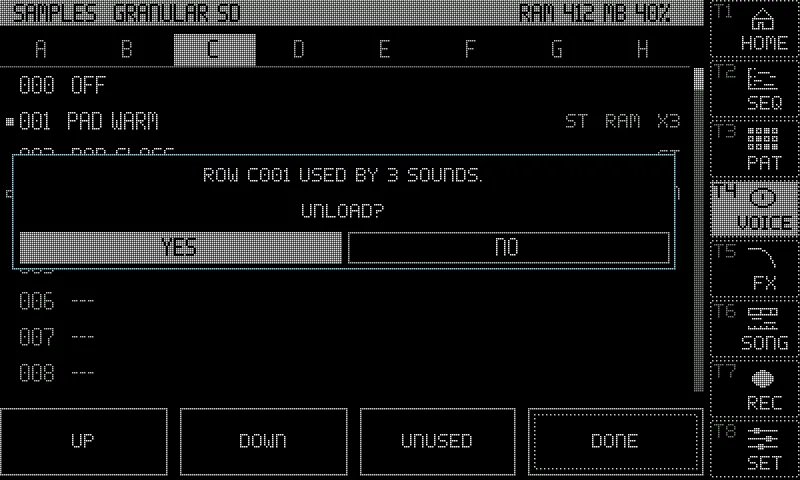
Section titled “A row in use”A row is in use when a voice plays it now, or when it was seen playing in this project. Replacing or unloading such a row:
- asks first: the Rytm’s bank list
C012 USED 3: YES=SET(a second YES sets it), the POOL page2 IN USE: YES AGAIN, the touchscreenROW C012 USED BY 3 SOUNDS., the web page a confirmation; - is refused while the Rytm plays:
PLAYING: STOP FIRST. Stop the Rytm first; - can be undone, one level per list.
An empty row never asks.
SELECT UNUSED
Section titled “SELECT UNUSED”The Sidecar cannot read the Rytm’s kits or patterns, so it only knows what it has seen playing since the project was opened. A row locked on a step that has not played yet looks unused. Every surface says so: NOT SEEN PLAYING - A RYTM LOCK MAY STILL USE IT. Play the project through before you unload what UNUSED selects.
ST and M: stereo samples
Section titled “ST and M: stereo samples”The pool lists tag each sample ST (stereo) or M (mono). A stereo file is kept in stereo in memory (twice the memory of a mono one). On its track a voice plays the sum of the two channels, as before; routed to PRE or POST it plays in stereo. poolmono=1 in cmdline.txt sums stereo files at load instead: half the memory.
The pool RAM
Section titled “The pool RAM”One shared memory for the samples of GRANULAR, DSP SAMPLE and MULTISAMPLE: a file used by two machines (or by an instrument and the SAMPLES list) is in memory once.
| Board | Default size |
|---|---|
| 2 or 4 GB (Pi 4B or Pi 5) | 1 GB |
| 8 GB | 3 GB |
- Set it with
poolram=MBincmdline.txt. - Every POOL view shows it as MB and percent (
RAM 412 MB 40%). WAVETABLE’s table memory is counted in the figure. - When it is full, the least recently used samples that no voice is playing make room.
- A sample longer than 87 s at 48 kHz is cut (
TOO LONG: FIRST 87 S); a wavetable file is at most 8 MB (TOO BIG: 8 MB MAX). - Samples load on first play (0.4.0): nothing is loaded whole when a project opens, so projects open faster. A sample comes in when a voice selects it (GRANULAR, CHOP, DSP SAMPLE); a MULTISAMPLE instrument brings its heads, and the rest of a sample comes into memory in the background after its first note. Then it stays until the room is needed. Tables load when a voice uses them. in testing
- MULTISAMPLE keeps the first half second of each sample in memory and streams the rest; a row can be held whole (“always in RAM”, see Stereo and the OUT route).
The sample library
Section titled “The sample library”The Sidecar keeps an index of every sample and instrument on its card, each known by a fingerprint of its content (a SHA-256 hash), with the path as a hint. A pool row points at a fingerprint, so:
- a moved or renamed file is found again and keeps playing (MOVED); the row’s path is updated at the next save;
- a missing file is flagged:
!name, MISSING, and the row is silent; - a changed file (other content at the same path) still plays and is flagged:
~name, CHANGED. ACCEPT (touchscreen, POOL page, web Accept) makes the row take the new content; - bundles never copy a sample twice: an import reuses a file with the same content wherever it is on the card.
After a boot the Sidecar reads its index (/.rytm/library/), walks the card’s folders and fingerprints what is new or changed, a small piece at a time on its own core: about 2-3 minutes a GB the first time on a big card, afterwards only changes. While the Rytm plays it only reads in small pieces; while the recorder records it stops. Files the Sidecar writes itself (uploads, takes, imports) are fingerprinted as they are written. The Overbridge recorder’s takes in /Recordings are indexed but fingerprinted only when used.
Where to see it: the web page’s Status tab, Storage (Library 48,213 files (18 GB), 61 % hashed, ... 212 duplicates), and the touchscreen’s SIDECAR STATUS page (LIBRARY 48K FILES 61%). After copying files onto the card on a computer, lib=rescan on the console walks the card again.
The lists are per project: /.rytm/projects/<project>/samples.pool.txt, wavetables.pool.txt, instruments.pool.txt, and pool-used.txt (what was seen playing). They are written a moment after an edit. A list file from a newer Sidecar, or a damaged one, is locked: shown, never written over (POOL LOCKED). The pool files of the 0.3 test builds stay on the card and are not read.
Limitations
Section titled “Limitations”- Sidecar (Pi) only. Not yet run on hardware.
- UNUSED knows only what played since the project was opened (above).
- No FUNC override while the Rytm plays: stop it to replace or unload a row in use.
- FILL is not offered for INSTRUMENTS; add each
.sfzon its own. - Folder instruments (WAVs without an
.sfz) are not offered. - DSP SAMPLE plays a file outside
/Samplesfrom memory only (not streamed), and a take written since the last boot only after the next boot. - An instrument is known by its
.sfzfile’s own fingerprint: two.sfzfiles with the same text are one entry. - Paths of 160 characters or more are not indexed by the library.