Poly machines
Three new machines join the machine list on every track, after DSP SAMPLE: WAVETABLE, GRANULAR and MULTISAMPLE. All three are polyphonic, play chords from one trig, and can be poly tracks. Like every Sidecar machine, they play through the track’s analog filter and amp. in testing
Chords on page 2
Section titled “Chords on page 2”6-OP FM, MULTISAMPLE, WAVETABLE and GRANULAR share four chord knobs on the SMPL page, E..H:
| Knob | Values |
|---|---|
| CHD | OFF MAJ MIN SUS2 SUS4 7 MAJ7 MIN7 DIM AUG 6 MIN6 9 ADD9 MIN9 5: the chord on the trig’s note; OFF plays one note |
| INV | INV0..INV3: the lowest notes moved an octave up |
| SPR | SPR0..SPR2: the voicing opened over 1..3 octaves |
| VOI | AUTO, 1..6: the number of notes (more repeat the chord an octave up) |
Each can be p-locked per step on the Rytm, so a normal Rytm track can play a chord per step. On 6-OP FM, E..H were unused before, so old kits play as they did.
Live chords: with CHRO on, chords played on the pads sound at once; with RECORD + PLAY each chord is written to its step as the NOTE plus CHD / INV / SPR / VOI locks.
| Machine | Notes per voice | Notes in all |
|---|---|---|
| 6-OP FM | 6 | 24 |
| MULTISAMPLE | 16 | 64 |
| WAVETABLE | 8 | 32 |
| GRANULAR | 6 | 24 |
On a poly track these machines (and 6-OP FM) allocate notes from their own pools: their POLY CONFIG takes VOICES only (the most notes held at once; AUTO: the counts above). Every other Sidecar machine can be a poly track too, through the instance pool. in testing
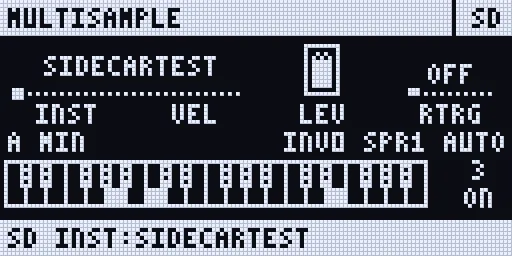
MULTISAMPLE
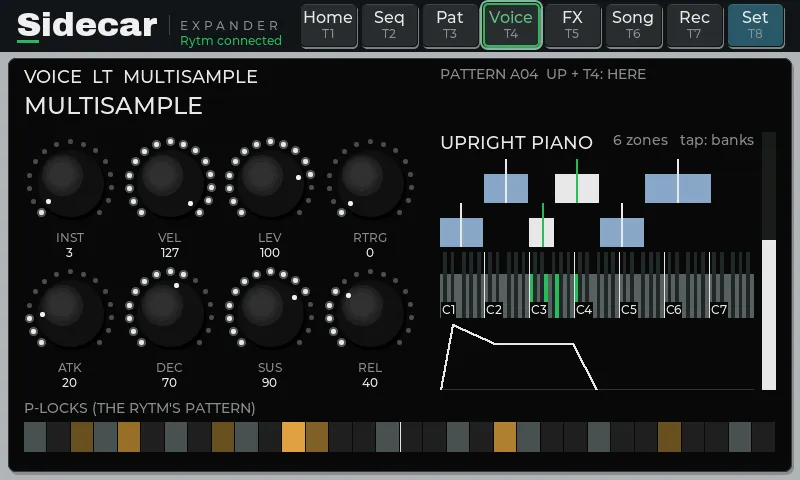
Section titled “MULTISAMPLE”A multisampled instrument player. Instruments are SFZ files (a subset of the format) with WAV or AIFF samples of any common depth and rate: key and velocity zones, layers, round robin, loops, release samples. Samples stream from the SD card while they play: only the first half second of each sample is in memory.
| Knob | SRC page (A..H) | SMPL page (A..H) |
|---|---|---|
| A..D | INST (the instrument), VEL (velocity sensitivity), LEV (100 = unity), RTRG (release samples OFF / ON) | TUNE (semitones), FINE, STRT (start offset), LOOP (AUTO / OFF / ON) |
| E..H | ATK, DEC, SUS, REL (64 = the instrument’s own envelope) | CHD, INV, SPR, VOI |
- INST picks a row of the project’s INSTRUMENTS POOL. Put instruments on the card (for example
/MULTISAMPLE/<folder>/<name>.sfzwith its samples; the web page’s Files tab uploads a whole folder), then load one into a row: FUNC + YES in the bank list on the Rytm, FILES on the touchscreen’s POOL, or +INST on the web page’s Files tab. The auto-sampler’s instruments and the sampler’s slice maps go in by themselves. - The SRC page on the Rytm shows the instrument’s name. The touchscreen’s VOICE page shows its zones on a keyboard and the envelope.
- Memory: 8 instruments are kept loaded, in the shared pool RAM; the least recently used is replaced. A trig before its instrument has loaded plays when it has (within 250 ms).
- The card’s speed limits how many notes can stream at once, more so while the recorder writes. A card test on the Sidecar measures it.
- Tonverk instruments (0.4.0): MULTISAMPLE also reads Elektron Tonverk’s
.elmultifiles, in the pools, the browser and bundles, beside.sfz. The format is not publicly documented; it is read from a public description and real files, so its conventions are unverified: key ranges go to the nearer root, velocity layers from each layer’s value, loop crossfades are ignored (a hard loop jump). in testing - Very short Rytm trigs always sound (0.3.0): a note let go before it started still plays its attack, then releases.
WAVETABLE
Section titled “WAVETABLE”A band-limited wavetable synth: no audible aliasing at any pitch.
| Knob | SRC page (A..H) | SMPL page (A..H) |
|---|---|---|
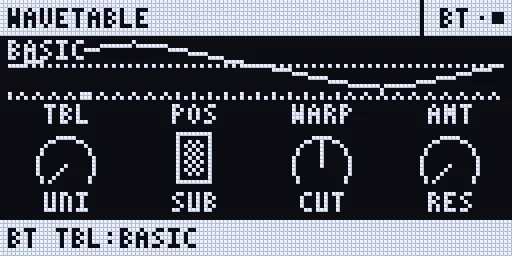
| A..D | TBL (the table), POS (the frame position), WARP (OFF SYNC PWM FM), AMT (the warp’s amount) | ATK, DEC (also the release), SUS, ENV (the mod envelope onto POS) |
| E..H | UNI (unison: up to 7 oscillators, detuned), SUB (a sine an octave down), CUT (low-pass below 64, open at 64, high-pass above), RES (resonance and drive) | CHD, INV, SPR, VOI |
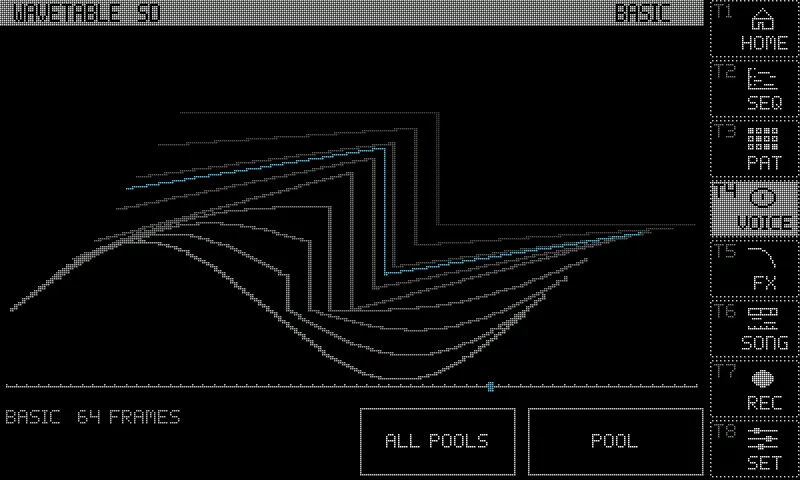
- Tables: TBL picks a row of the project’s WAVETABLES POOL: the six built-ins (BASIC PWM VOCAL ORGAN FM SYNC, 64 frames each, in A001..A006 of a new project) or any WAV or AIFF on the card, in the format Serum, Vital and others write (frames of 2048 samples, or the size in the file’s
clmchunk, or 1024 / 512 / 256, or one single cycle). Up to 256 frames, 8 MB a file. - The SRC page on the Rytm draws the frame at POS and the table’s frames; the touchscreen draws the table as a stack of frames.
GRANULAR
Section titled “GRANULAR”A granular machine on card samples or on the Rytm’s live audio.
| Knob | SRC page (A..H) | SMPL page (A..H) |
|---|---|---|
| A..D | SRC (the source), POS (where the grains read), SPRY (position and timing jitter), SIZE (5 ms .. 1 s) | ATK, REL, HOLD (0..99, then FRZ), ANIM (OFF, 8BAR .. 1/16) |
| E..H | DENS (1 .. 200 grains a second), PRND (random pitch per grain), REV (reverse probability), WIN (HANN TRI TUKEY PERC) | CHD, INV, SPR, VOI |
- Sources: SRC picks a row of the project’s SAMPLES POOL, shared with DSP SAMPLE and the sampler’s takes: the live inputs IN (the Rytm’s AUDIO IN L + R), MAIN and the voice outputs BD SD RS-CP BT LT MT-HT CH-OH CY-CB (recorded live into a 5.5 s ring), the built-ins PAD and BELLS (in bank H of a new project), or any WAV or AIFF on the card. A new GRANULAR track points at an empty row: load a source first.
- HOLD: on a card sample, the playhead’s speed (1x at 0, stopped at 99); on a live source, feedback. FRZ (120..127) stops the playhead or the live ring.
- ANIM moves the head, the grain size and the density in a cycle locked to the Rytm’s clock (8 bars to 1/16).
- Each note is its own grain stream at its pitch (C4 plays the source as it is). Up to 64 grains a voice.
- Careful with MAIN or the track’s own stem as a live source: they contain the voice’s own output (a feedback loop).
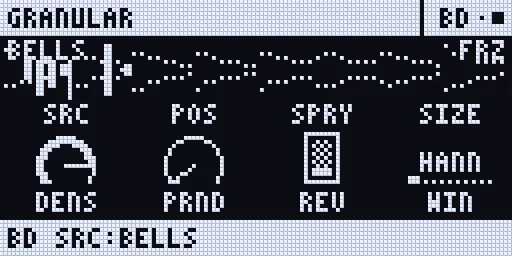
Choosing a source: the POOL
Section titled “Choosing a source: the POOL”GRANULAR’s SRC, WAVETABLE’s TBL and MULTISAMPLE’s INST each pick a row of their own POOL list: 8 banks, A..H, of 128 rows, row 000 OFF in every bank. The row is part of the knob’s value, so it is saved in the kit and in p-locks.
- On the Rytm: turn knob A on the SRC page, or press UP + SRC: the bank list opens (LEFT / RIGHT the bank, the knob or UP / DOWN the row, YES chooses, NO cancels, YES with trigs held locks it). FUNC + YES opens the card’s browser aimed at the row: load a file into it. (DSP SAMPLE, not a poly machine, picks its sample on knob D of its SMPL page instead: DSP SAMPLE.)
- On the touchscreen: the machine view (UP + T4), POOL: tap a row to play it, tap an empty row to fill it from FILES. ALL POOLS shows the three lists.
- On the web page: the Pool tab, and +SMP / +WT / +INST and Fill bank on the Files tab.
The SRC page then shows the source’s name; an empty row reads like B005, a missing file !name, a changed one ~name. See Pools and the sample library for the lists, loading, the pool RAM and unloading.
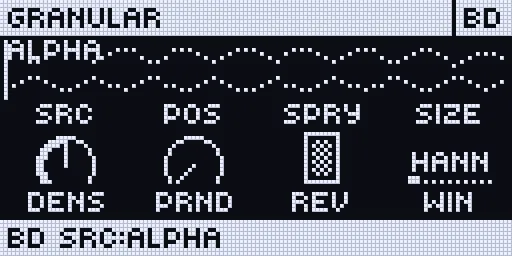
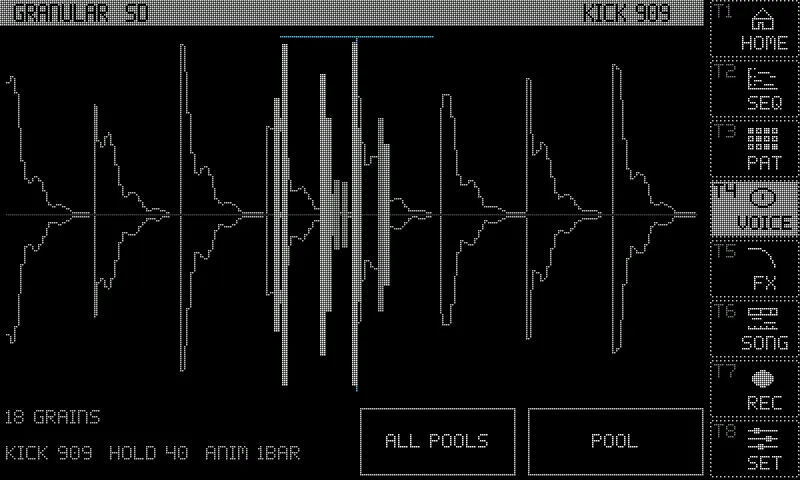
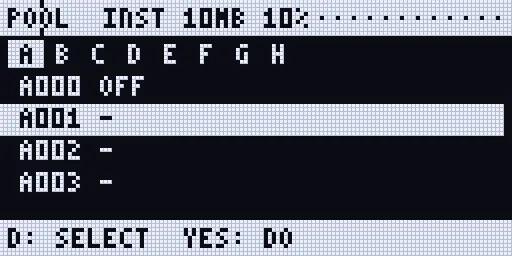
Screenshots: rendered off-device by the Sidecar’s own page code, with made-up data.
Limitations
Section titled “Limitations”- Sidecar (Pi) only.
- The bank list on the Rytm needs the Sidecar connected and drawing the SRC page. Without it, knob A steps one source a detent and keeps the bank.
- The Rytm holds one bank’s names at a time; another bank’s rows read
B005until the Sidecar sends them. - MIDI: with PARAM OUTPUT set to NRPN, the knob’s NRPN carries the bank; in CC mode, CC 16 carries only the index (bank lost).
- Locks from the bank list need GRID REC. A source lock set on a poly step keeps bank A.
- Tables and instruments load at their first use; the first trig may wait for them (up to 250 ms). Samples the project played before are loaded ahead when it opens.
- MULTISAMPLE rows are not previewed.
- Projects made with the 0.3 test builds’ source banks open with the new POOL template: load their sources again.